Dependency Graph
Complete map of dependencies between all 13 Bricks modules and their external frameworks.
Three Levels of Dependencies
Understanding the dependency graph is essential for working with Bricks. Dependencies exist at three levels:
- Internal: which Bricks modules depend on other Bricks modules
- External: third-party packages fetched via Swift Package Manager
- Vendored: pre-built binary frameworks bundled in
Bricks/Library/
Each level has different implications for build times, version management, and how customer apps integrate with the platform.
Internal Module Dependencies
The 13 modules form a clear hierarchy. YoullNetwork and TimerShared sit at the bottom with no Bricks dependencies. Core builds on YoullNetwork. Most feature modules depend on Core (and often YoullNetwork). Client sits at the top, orchestrating everything.
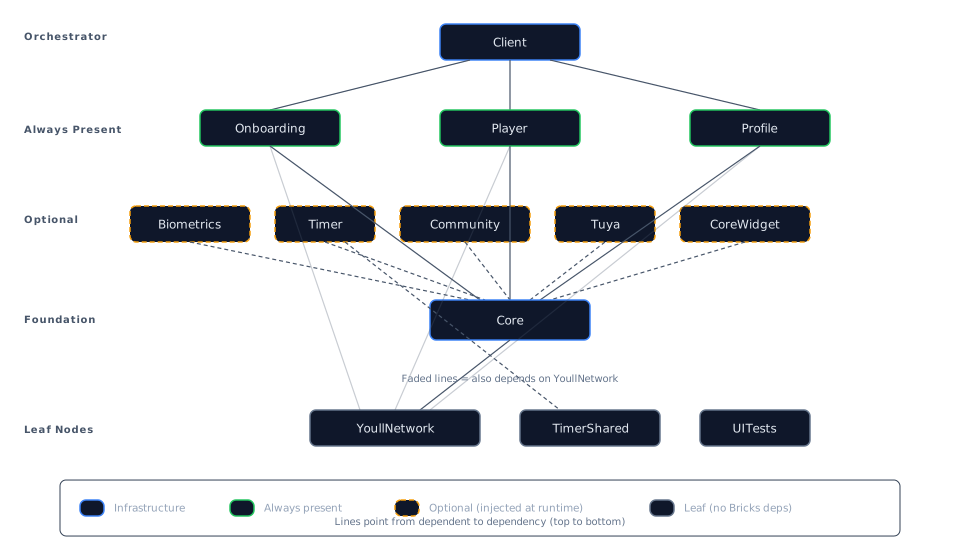
Client depends on Core, Onboarding, Player, and Profile. Timer depends on both Core and TimerShared. Most Layer 2 modules also depend on YoullNetwork (shown as faded lines).
Full Dependency Table
| Module | Depends On | Dependency Count |
|---|---|---|
| YoullNetwork | None | 0 (leaf) |
| TimerShared | None | 0 (leaf) |
| UITests | None | 0 (leaf) |
| Core | YoullNetwork | 1 |
| Biometrics | Core | 1 |
| Timer | Core, TimerShared | 2 |
| Player | Core, YoullNetwork | 2 |
| Profile | Core, YoullNetwork | 2 |
| Onboarding | Core, YoullNetwork | 2 |
| Community | Core, YoullNetwork | 2 |
| Tuya | Core, YoullNetwork | 2 |
| CoreWidget | Core, YoullNetwork | 2 |
| Client | Core, Onboarding, Player, Profile | 4 |
Dependency Layers
Grouping modules by their depth in the dependency tree:
Layer 0 (Leaf nodes, no Bricks dependencies):
- YoullNetwork, TimerShared, UITests
Layer 1 (Depends on one leaf module):
- Core (depends on YoullNetwork)
Layer 2 (Depends on Core and optionally one other):
- Player, Profile, Onboarding, Community, Tuya, CoreWidget (all depend on Core + YoullNetwork)
- Timer (depends on Core + TimerShared)
- Biometrics (depends on Core only)
Layer 3 (Top-level orchestrator):
- Client (depends on Core + three Layer 2 modules)
Client is the only module with more than two internal dependencies. It imports Onboarding, Player, and Profile directly because these three modules are always active in every customer app. The four optional modules (Timer, Biometrics, Community, Tuya) are never imported by Client. Instead, Client references their interface protocols defined in Core and receives concrete instances at runtime.
External Dependencies
These packages are fetched from remote Git repositories via Swift Package Manager.
Apollo iOS
| Detail | Value |
|---|---|
| URL | github.com/apollographql/apollo-ios |
| Version | >= 1.15.0 |
| Used by | YoullNetwork |
| Products | Apollo, ApolloAPI, ApolloSQLite |
Apollo powers all GraphQL networking in Youll. It is only a direct dependency of YoullNetwork, which means other modules interact with GraphQL data through YoullNetwork's API classes rather than importing Apollo themselves.
YoullNetwork also contains a GraphQL sub-package (Swift tools 5.7) that depends on ApolloAPI >= 1.0.0 for generated schema types.
Firebase iOS SDK
| Detail | Value |
|---|---|
| URL | github.com/firebase/firebase-ios-sdk |
| Version | 8.7.0 ..< 12.2.0 |
| Used by | Client, Onboarding |
Firebase is split across two modules with different product imports:
| Module | Firebase Products |
|---|---|
| Client | FirebaseCrashlytics, FirebaseMessaging, FirebaseRemoteConfig |
| Onboarding | FirebaseAuth, FirebaseDatabase, FirebaseAnalytics |
Client uses Firebase for crash reporting, push notification tokens, and feature flags. Onboarding uses it for authentication and user data. Both modules declare the same version range, so SPM resolves them to a single version.
Google Sign-In
| Detail | Value |
|---|---|
| URL | github.com/google/GoogleSignIn-iOS |
| Version | >= 8.1.0-vwg-eap-1.1.0 |
| Used by | Onboarding |
| Products | GoogleSignIn, GoogleSignInSwift |
Used exclusively by the Onboarding module to provide Google account authentication as one of the sign-in options alongside email and Apple Sign-In.
LNPopupController
| Detail | Value |
|---|---|
| URL | github.com/LeoNatan/LNPopupController |
| Version | >= 4.0.0 |
| Used by | Core |
| Products | LNPopupController |
A popup presentation controller used by Core's UI infrastructure, likely for the mini player bar and similar floating UI elements that appear above the tab bar.
Vendored Binary Frameworks
Instead of fetching these frameworks from remote registries, Bricks bundles pre-built .xcframework files in the Bricks/Library/ directory. This eliminates version resolution during builds and ensures every customer app uses the exact same binary.
Core as the Framework Gateway
Core's Package.swift declares the vendored binary targets and re-exports them as library products. Other modules consume these frameworks via .product(name: "SDWebImage", package: "core") rather than declaring their own binary targets. This means Core is the single distribution point for most vendored frameworks.
Client serves a similar role for its own vendored frameworks (AppsFlyerLib, BrazeKit, BrazeUI, PurchaseConnector), though no other module consumes those.
Framework Distribution Table
| Framework | Declared By | Consumed By |
|---|---|---|
| SDWebImage | Core | Core, Client, Player, Profile, Onboarding, Community, Tuya |
| SDWebImageSwiftUI | Core | Core, Client |
| SDWebImageWebPCoder | Core | Core, Player, Onboarding |
| libwebp | Core | Core, Player |
| SnapKit | Core | Core, Player, Profile, Onboarding |
| Lottie | Core | Core, Profile |
| AppsFlyerLib | Client | Client |
| PurchaseConnector | Client | Client |
| BrazeKit | Client | Client |
| BrazeUI | Client | Client |
SDWebImage is the most widely consumed vendored framework, used by 7 of the 13 modules for image loading and caching. SnapKit (auto layout DSL) is used by 4 modules.
Unreferenced Frameworks
Two frameworks exist in Bricks/Library/ but are not declared as dependencies in any module's Package.swift:
- Pulse.xcframework
- PulseUI.xcframework
These are likely consumed directly by customer apps for network debugging during development, or used only in debug build configurations.
Key Observations
Optional Modules Have Light Footprints
The four runtime-injected modules (Timer, Biometrics, Community, Tuya) have notably fewer dependencies than the always-present modules. Biometrics depends only on Core. This makes them easy to include or exclude from a customer app without pulling in large dependency trees.
Swift Concurrency Migration Is Partial
Three modules (Timer, TimerShared, Biometrics) use Swift tools 6.2 with strict concurrency features (@MainActor default isolation, NonisolatedNonsendingByDefault, InferIsolatedConformances). The remaining 10 modules use Swift tools 5.9. This split reflects an incremental migration toward Swift's structured concurrency model.
iOS Deployment Targets Vary
Most modules target iOS 15. Three modules require iOS 16:
| Module | Minimum iOS |
|---|---|
| Biometrics | iOS 16 |
| Community | iOS 16 |
| UITests | iOS 16 |
Customer apps that include Biometrics or Community must set their deployment target to iOS 16 or higher.
No Circular Dependencies
The dependency graph is strictly acyclic. No module depends on another module that depends back on it. This is enforced by the Swift Package Manager's build system, which does not allow circular package references.
For Agents
When working with Bricks module dependencies:
Finding dependency information:
- Each module's dependencies are declared in its
Package.swiftatBricks/modules/{ModuleName}/Package.swift - Look for
.package(path:)for internal Bricks dependencies - Look for
.package(url:)for external remote dependencies - Look for
.binaryTargetfor vendored frameworks
Adding a new internal dependency:
- Add the dependency in the module's
Package.swiftunderdependencieswith.package(path: "../OtherModule") - Add the product to the target's
dependenciesarray - Verify no circular dependency is introduced
Adding a new vendored framework:
- Place the
.xcframeworkinBricks/Library/ - Declare it as a
.binaryTargetin the module that will manage it (typically Core for shared frameworks) - Add it as a library product so other modules can consume it
- Other modules reference it via
.product(name: "FrameworkName", package: "core")
Adding a new external SPM dependency:
- Add the remote URL and version in the module's
Package.swiftunderdependencies - Add specific products to the target's
dependenciesarray - Prefer version ranges to exact versions for compatibility
Quick reference for common lookups:
- "What does this module depend on?" Check the module's
Package.swift - "Who uses this framework?" Search all
Package.swiftfiles for the framework name - "Can I import module X from module Y?" Check if Y declares X as a dependency. If not, you cannot import it.
- "Is this module always present?" Client, Core, YoullNetwork, Player, Profile, and Onboarding are always present. Timer, Biometrics, Community, and Tuya are optional.
What's Next
Architecture Overview
How the Youll platform is structured across three layers, from the shared Bricks core to customer-specific configuration.
Bootstrap Sequence
The initialization order when a customer app launches, covering AppDelegate setup, SceneDelegate module injection, and the conditions required before the first screen appears.